Conclusion
August, 2019
1 Objective
The goal of this session is to compare the performance of all the models created during this exercise.
Here we will expand the analysis done individually in each model to compare how it is performing against each other.
2 Model evaluation
2.1 Getting the predicted score from each model
We will start this task by consolidating all the actual and predicted score for all models in a single data frame for the full, train and test datasets.
## making preditions for each model and consilidating in a single data frame
prob.full   <-  list()
prob.train  <-  list()
prob.test   <-  list()

# getting predicted and actual values in the full dataset
prob.full$logistic.actual         <- loan_dataset_logistic$y_loan_defaulter
prob.full$logistic.predicted      <- predict(logistic.step, type = "response",
                                             newdata = loan_dataset_logistic)
prob.full$decision.tree.actual    <- loan_dataset_DT$y_loan_defaulter
prob.full$decision.tree.predicted <- predict(tree.prune, type = "prob",
                                             newdata = loan_dataset_DT)[, 2]
prob.full$boosting.actual         <- loan_dataset_boost$y_loan_defaulter
prob.full$boosting.predicted      <- predict.boosting(boost,
                                                      newdata = loan_dataset_boost)$prob[, 2]
prob.full$random.forest.actual    <- loan_dataset_rf$y_loan_defaulter
prob.full$random.forest.predicted <- predict(rf.full, type = "prob",
                                             newdata = loan_dataset_rf)[, 2]

# getting predicted and actual values in the train dataset
prob.train$logistic.actual         <- data.train_logistic$y_loan_defaulter
prob.train$logistic.predicted      <- predict(logistic.step, type = "response",
                                              newdata = data.train_logistic)
prob.train$decision.tree.actual    <- data.train_DT$y_loan_defaulter
prob.train$decision.tree.predicted <- predict(tree.prune, type = "prob",
                                              newdata = data.train_DT)[, 2]
prob.train$boosting.actual         <- data.train_boost$y_loan_defaulter
prob.train$boosting.predicted      <- predict.boosting(boost, newdata =
                                                          data.train_boost)$prob[, 2]
prob.train$random.forest.actual    <- data.train_rf$y_loan_defaulter
prob.train$random.forest.predicted <- predict(rf.full, type = "prob",
                                              newdata = data.train_rf)[, 2]

# getting predicted and actual values in the test dataset
prob.test$logistic.actual         <- data.test_logistic$y_loan_defaulter
prob.test$logistic.predicted      <- predict(logistic.step, type = "response",
                                             newdata = data.test_logistic)
prob.test$decision.tree.actual    <- data.test_DT$y_loan_defaulter
prob.test$decision.tree.predicted <- predict(tree.prune, type = "prob",
                                             newdata = data.test_DT)[, 2]
prob.test$boosting.actual         <- data.test_boost$y_loan_defaulter
prob.test$boosting.predicted      <- predict.boosting(boost, newdata =
                                                         data.test_boost)$prob[, 2]
prob.test$random.forest.actual    <- data.test_rf$y_loan_defaulter
prob.test$random.forest.predicted <- predict(rf.full, type = "prob",
                                             newdata = data.test_rf)[, 2]

# converting lists into tibble
prob.full   <- prob.full   %>% as_tibble()
prob.train  <- prob.train  %>% as_tibble()
prob.test   <- prob.test   %>% as_tibble()
2.2 Getting performance measures for each model.
To calculate the performance measures, derived from the confusion matrix, of each model we need to find the score cut off that best split our test dataset into Defaulters and Non-Defaulters.
In this exercise we decide to not prioritize the accuracy on predicting Defaulters and Non-Defaulters, therefore we are looking for the score cut off that best predict each class equally.
We will use the custom functions described in Auxiliary metrics functions topic in the Data Preparation session of this site.
With the returned object from these functions we can plot the comparison between TPR (True Positive Rate) and TNR (True Negative Rate) to find the best cut off.
## getting cut off measures -----------------------------------------------------------------

metricsByCutoff.test_log    <- modelMetrics(prob.test$logistic.actual,
                                            prob.test$logistic.predicted,
                                            plot_title = 'Logistic Regression')
metricsByCutoff.test_DT     <- modelMetrics(prob.test$decision.tree.actual,
                                            prob.test$decision.tree.predicted,
                                            plot_title = 'Decision Tree')
metricsByCutoff.test_boost  <- modelMetrics(prob.test$boosting.actual,
                                            prob.test$boosting.predicted,
                                            plot_title = 'Boosting')
metricsByCutoff.test_rf     <- modelMetrics(prob.test$random.forest.actual,
                                            prob.test$random.forest.predicted,
                                            plot_title = 'Random Forest')

cutoffs <- plotly::subplot(metricsByCutoff.test_log$Plot,
                   metricsByCutoff.test_DT$Plot,
                   metricsByCutoff.test_boost$Plot,
                   metricsByCutoff.test_rf$Plot,
                   nrows = 2) %>% hide_legend() %>%
                   layout(title="Comparing cut off measures of all models")

cutoffs
Having the best score cut off for each model we use HMeasure() function from hmeasure library to calculate the full set of metrics for classification methods.
# logistic regression
measures.logistic.train <- HMeasure(prob.train$logistic.actual,
                                    prob.train$logistic.predicted,
                                    threshold = metricsByCutoff.test_log$BestCut['Cut'])
measures.logistic.test <- HMeasure(prob.test$logistic.actual,
                                   prob.test$logistic.predicted,
                                   threshold = metricsByCutoff.test_log$BestCut['Cut'])

# decision tree
measures.decision.tree.train <- HMeasure(prob.train$decision.tree.actual,
                                         prob.train$decision.tree.predicted,
                                         threshold = metricsByCutoff.test_DT$BestCut['Cut'])
measures.decision.tree.test <- HMeasure(prob.test$decision.tree.actual,
                                        prob.test$decision.tree.predicted,
                                        threshold = metricsByCutoff.test_DT$BestCut['Cut'])

# boosting
measures.boosting.train <- HMeasure(prob.train$boosting.actual,
                                    prob.train$boosting.predicted,
                                    threshold = metricsByCutoff.test_boost$BestCut['Cut'])
measures.boosting.test  <- HMeasure(prob.test$boosting.actual,
                                    prob.test$boosting.predicted,
                                    threshold = metricsByCutoff.test_boost$BestCut['Cut'])

# random forest
measures.random.forest.train <- HMeasure(prob.train$random.forest.actual,
                                         prob.train$random.forest.predicted,
                                         threshold = metricsByCutoff.test_rf$BestCut['Cut'])
measures.random.forest.test  <- HMeasure(prob.test$random.forest.actual,
                                         prob.test$random.forest.predicted,
                                         threshold = metricsByCutoff.test_rf$BestCut['Cut'])

# join measures in a single data frame
measures <- t(bind_rows(measures.logistic.train$metrics,
                        measures.logistic.test$metrics,
                        measures.decision.tree.train$metrics,
                        measures.decision.tree.test$metrics,
                        measures.boosting.train$metrics,
                        measures.boosting.test$metrics,
                        measures.random.forest.train$metrics,
                        measures.random.forest.test$metrics
                        )) %>% as_tibble(., rownames = NA)

colnames(measures) <- c('logistic - train', 'logistic - test',
                        'decision.tree - train', 'decision.tree - test',
                        'boosting - train', 'boosting - test',
                        'random forest - train', 'random forest - test')

measures$metric = rownames(measures)

measures <- dplyr::select(measures, metric, everything())
Below are the metrics on the train dataset:
| logistic - train | decision.tree - train | boosting - train | random forest - train | |
|---|---|---|---|---|
| H | 0.3612900 | 0.4815174 | 0.8386978 | 1.0000000 |
| Gini | 0.6641411 | 0.7575883 | 0.9729990 | 1.0000000 |
| AUC | 0.8320705 | 0.8787941 | 0.9864995 | 1.0000000 |
| AUCH | 0.8475456 | 0.8787941 | 0.9880378 | 1.0000000 |
| KS | 0.5492033 | 0.6522478 | 0.9077926 | 1.0000000 |
| MER | 0.0920502 | 0.0732218 | 0.0397490 | 0.0000000 |
| MWL | 0.0859316 | 0.0662891 | 0.0175767 | 0.0000000 |
| Spec.Sens95 | 0.5339578 | 0.0878220 | 0.9320843 | 1.0000000 |
| Sens.Spec95 | 0.3725490 | 0.8830450 | 0.9215686 | 1.0000000 |
| ER | 0.3347280 | 0.2489540 | 0.1694561 | 0.0460251 |
| Sens | 0.8431373 | 0.9215686 | 1.0000000 | 1.0000000 |
| Spec | 0.6440281 | 0.7306792 | 0.8103044 | 0.9484778 |
| Precision | 0.2205128 | 0.2901235 | 0.3863636 | 0.6986301 |
| Recall | 0.8431373 | 0.9215686 | 1.0000000 | 1.0000000 |
| TPR | 0.8431373 | 0.9215686 | 1.0000000 | 1.0000000 |
| FPR | 0.3559719 | 0.2693208 | 0.1896956 | 0.0515222 |
| F | 0.3495935 | 0.4413146 | 0.5573770 | 0.8225806 |
| Youden | 0.4871654 | 0.6522478 | 0.8103044 | 0.9484778 |
| TP | 43.0000000 | 47.0000000 | 51.0000000 | 51.0000000 |
| FP | 152.0000000 | 115.0000000 | 81.0000000 | 22.0000000 |
| TN | 275.0000000 | 312.0000000 | 346.0000000 | 405.0000000 |
| FN | 8.0000000 | 4.0000000 | 0.0000000 | 0.0000000 |
Below are the metrics on the test dataset:
| logistic - test | decision.tree - test | boosting - test | random forest - test | |
|---|---|---|---|---|
| H | 0.3070793 | 0.3299682 | 0.4670309 | 0.4248541 |
| Gini | 0.5195531 | 0.5883799 | 0.7059218 | 0.6808939 |
| AUC | 0.7597765 | 0.7941899 | 0.8529609 | 0.8404469 |
| AUCH | 0.7915084 | 0.7966480 | 0.8803352 | 0.8654749 |
| KS | 0.4370950 | 0.5150838 | 0.6332961 | 0.6239106 |
| MER | 0.1078431 | 0.1029412 | 0.0980392 | 0.0980392 |
| MWL | 0.1210592 | 0.1042868 | 0.0788639 | 0.0808824 |
| Spec.Sens95 | 0.3072626 | 0.3840782 | 0.4134078 | 0.5139665 |
| Sens.Spec95 | 0.3200000 | 0.2736000 | 0.4400000 | 0.3200000 |
| ER | 0.3333333 | 0.2745098 | 0.2205882 | 0.2303922 |
| Sens | 0.6400000 | 0.8000000 | 0.8400000 | 0.7600000 |
| Spec | 0.6703911 | 0.7150838 | 0.7709497 | 0.7709497 |
| Precision | 0.2133333 | 0.2816901 | 0.3387097 | 0.3166667 |
| Recall | 0.6400000 | 0.8000000 | 0.8400000 | 0.7600000 |
| TPR | 0.6400000 | 0.8000000 | 0.8400000 | 0.7600000 |
| FPR | 0.3296089 | 0.2849162 | 0.2290503 | 0.2290503 |
| F | 0.3200000 | 0.4166667 | 0.4827586 | 0.4470588 |
| Youden | 0.3103911 | 0.5150838 | 0.6109497 | 0.5309497 |
| TP | 16.0000000 | 20.0000000 | 21.0000000 | 19.0000000 |
| FP | 59.0000000 | 51.0000000 | 41.0000000 | 41.0000000 |
| TN | 120.0000000 | 128.0000000 | 138.0000000 | 138.0000000 |
| FN | 9.0000000 | 5.0000000 | 4.0000000 | 6.0000000 |
By looking at the metrics we can see that the models performed well in the train dataset (especially Boosting and Random Forest).
But on the test dataset, the models are performing the same, with a clear advantage for Boosting and Random forest.
This is going to be clearer when we look to the score distribution and the ROC curve of each model.
2.3 Evaluating performance of each model
In this session we interpret the set of metrics we got from above steps.
2.3.1 Density Plots
Here we look back to the score density plot produced by each model side by side.
Interesting enough to notice here how narrow the scores produced from Decision Tree model compared to the other models.
As discussed in the Decision Tree session this model is extremely limited for this dataset with a huge variance in the tree depending on the train data and hyper parameters tuning.
We are using our custom function Score_Histograms described in the Function topic of Data Preparation session of this site.
density_plots <- ggarrange(Score_Histograms(prob.test,
                                            prob.test$logistic.predicted,
                                            prob.test$logistic.actual,
                                            'Logistic Regression'),
                           Score_Histograms(prob.test,
                                            prob.test$decision.tree.predicted,
                                            prob.test$decision.tree.actual,
                                            'Decision Tree'),
                           Score_Histograms(prob.test,
                                            prob.test$boosting.predicted,
                                            prob.test$boosting.actual,
                                            'Boosting'),
                           Score_Histograms(prob.test,
                                            prob.test$random.forest.predicted,
                                            prob.test$random.forest.actual,
                                            'Random Forest'))

density_plots <- annotate_figure(density_plots,
                                 top = text_grob("Density of All Models",
                                                 color = "black", face = "bold",
                                                 size = 14))

density_plots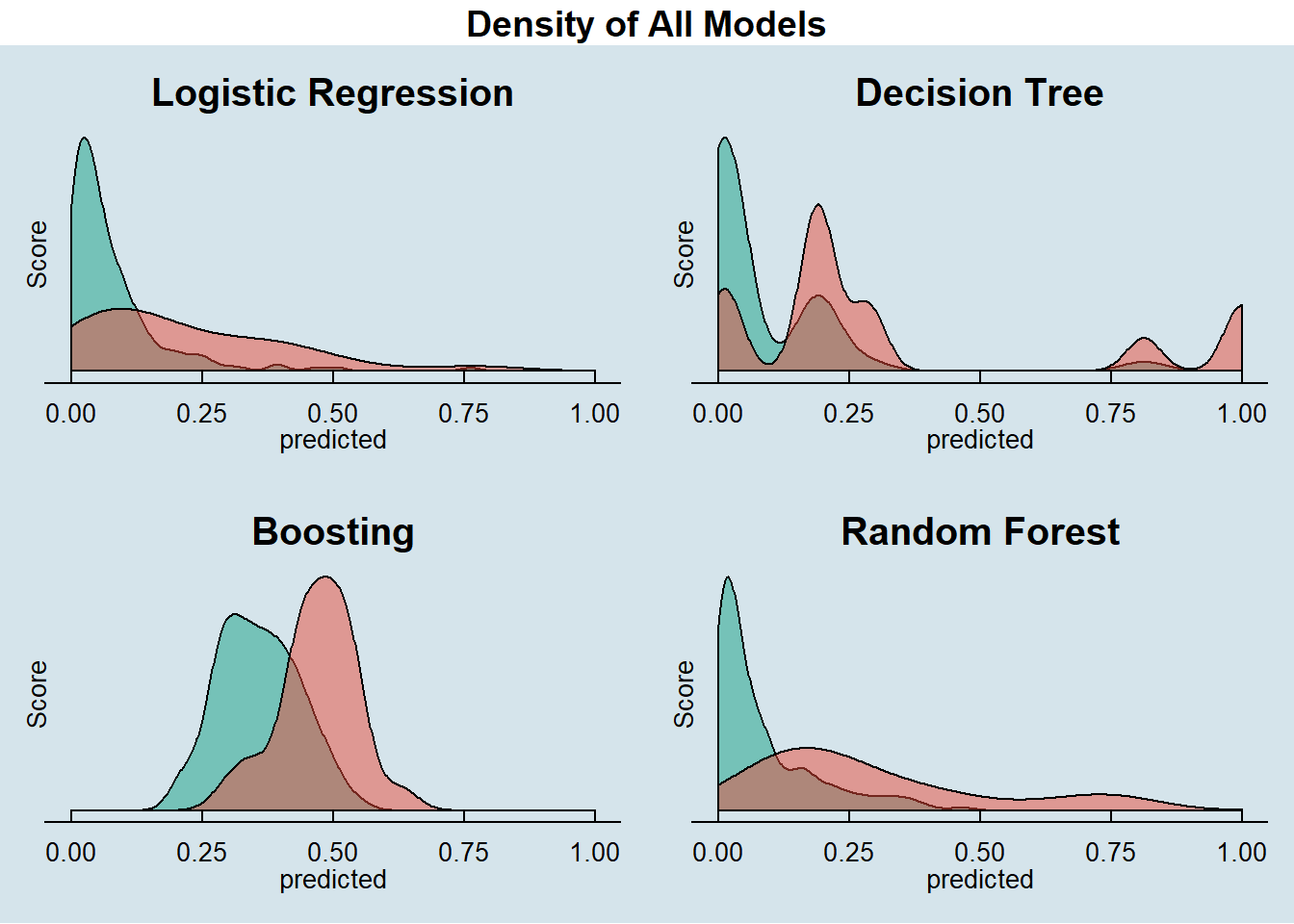
2.3.2 Score Boxplots
Let’s now look at the score boxplots of each model side by side.
This plot is a great way to visualize how well each model discriminate Defaulters and Non-Defaulters.
Here we can see that Random Forest and Boosting have an edge on the classification power against the other models. Both of them have not presented interquartile overlap in their box plot, another important sign of discrimination power of the models.
Our Decision Tree is right on the limit.
boxplots <- ggarrange(Score_Boxplot(prob.test,
                        prob.test$logistic.predicted,
                        prob.test$logistic.actual,
                        'Logistic Regression'),
          Score_Boxplot(prob.test,
                        prob.test$decision.tree.predicted,
                        prob.test$decision.tree.actual,
                        'Decision Tree'),
          Score_Boxplot(prob.test,
                        prob.test$boosting.predicted,
                        prob.test$boosting.actual,
                        'Boosting'),
          Score_Boxplot(prob.test,
                        prob.test$random.forest.predicted,
                        prob.test$random.forest.actual,
                        'Random Forest'))

boxplots <- annotate_figure(boxplots,
                            top = text_grob("Score Boxplots of All Models",
                                            color = "black", face = "bold",
                                            size = 14))

boxplots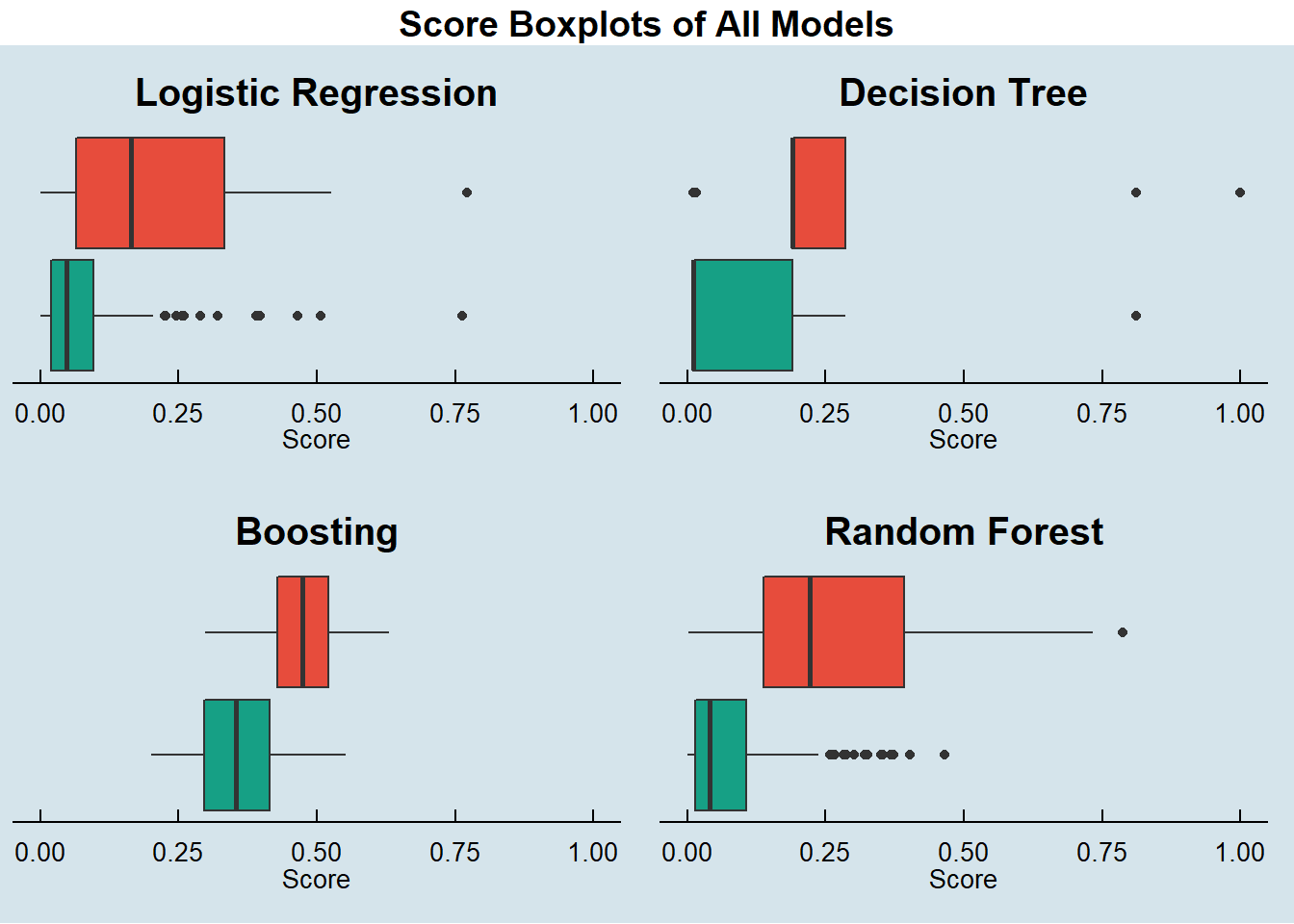
2.3.3 KS Plots
Now we look to the custom KS plots of each model side by side.
The KS metric is the maximum distance between the cumulative distribution functions of two samples.
KS metric ranges from 0 to 1, 0 meaning that there is no discrimination at all and 1 meaning a full discrimination.
In this case we are comparing the cumulative distribution sample of Defaulters and Non-Defaulters.
The bigger the KS metric the better the model are to discriminate Defaulters to Non-Defaulters.
KS_plots <- ggarrange(
  KS_Plot(prob.test$logistic.predicted[prob.test$logistic.actual == 0],
          prob.test$logistic.predicted[prob.test$logistic.actual == 1],
          'Logistic Regression'),
  KS_Plot(prob.test$decision.tree.predicted[prob.test$decision.tree.actual == 0],
          prob.test$decision.tree.predicted[prob.test$decision.tree.actual == 1],
          'Decision Tree'),
  KS_Plot(prob.test$boosting.predicted[prob.test$boosting.actual == 0],
          prob.test$boosting.predicted[prob.test$boosting.actual == 1],
          'Boosting'),
  KS_Plot(prob.test$random.forest.predicted[prob.test$random.forest.actual == 0],
          prob.test$random.forest.predicted[prob.test$random.forest.actual == 1],
          'Random Forest'))

KS_plots <- annotate_figure(KS_plots,
                            top = text_grob("KS Plots of All Models",
                                            color = "black", face = "bold",
                                            size = 14))

KS_plots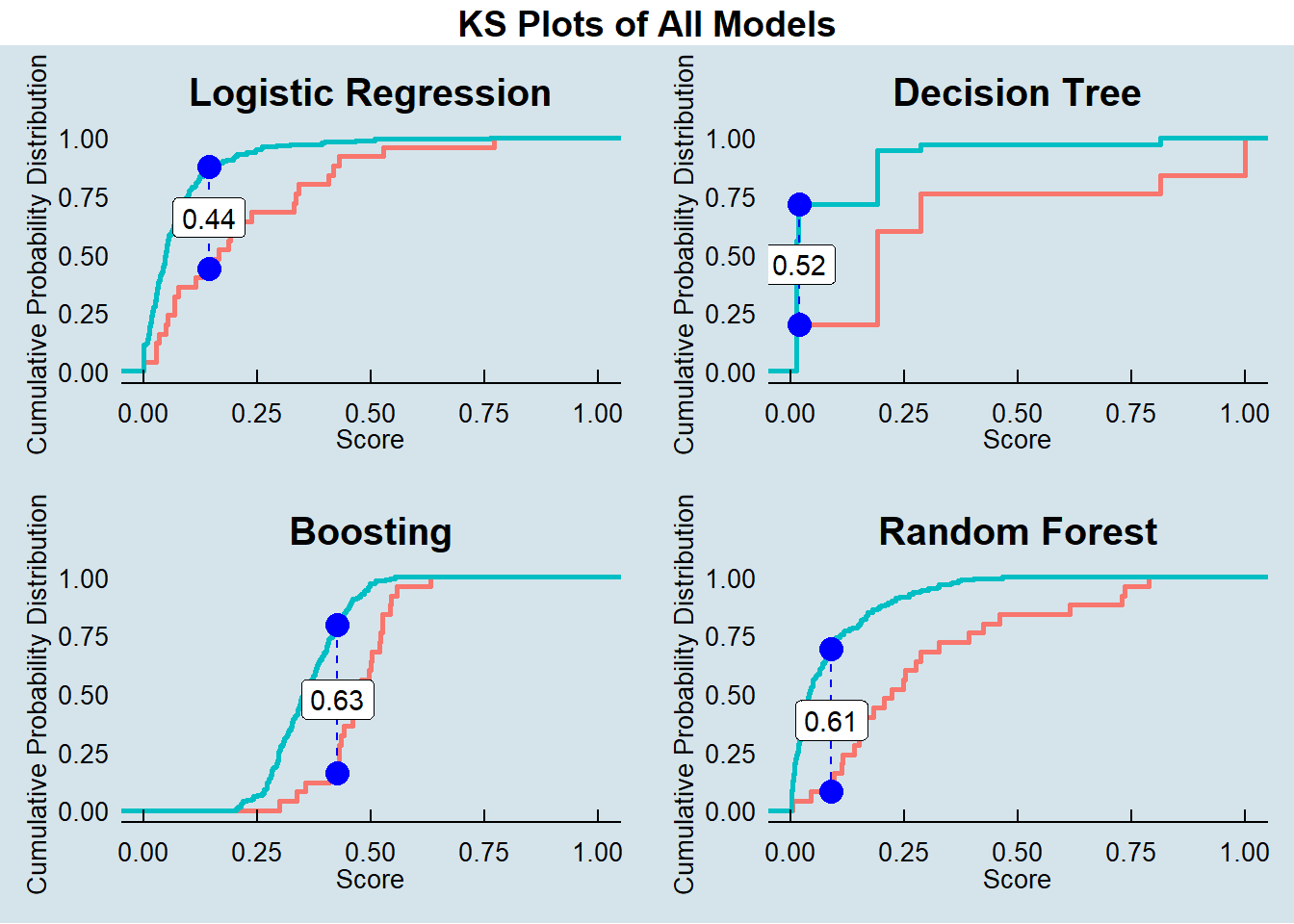
2.3.4 ROC Curve
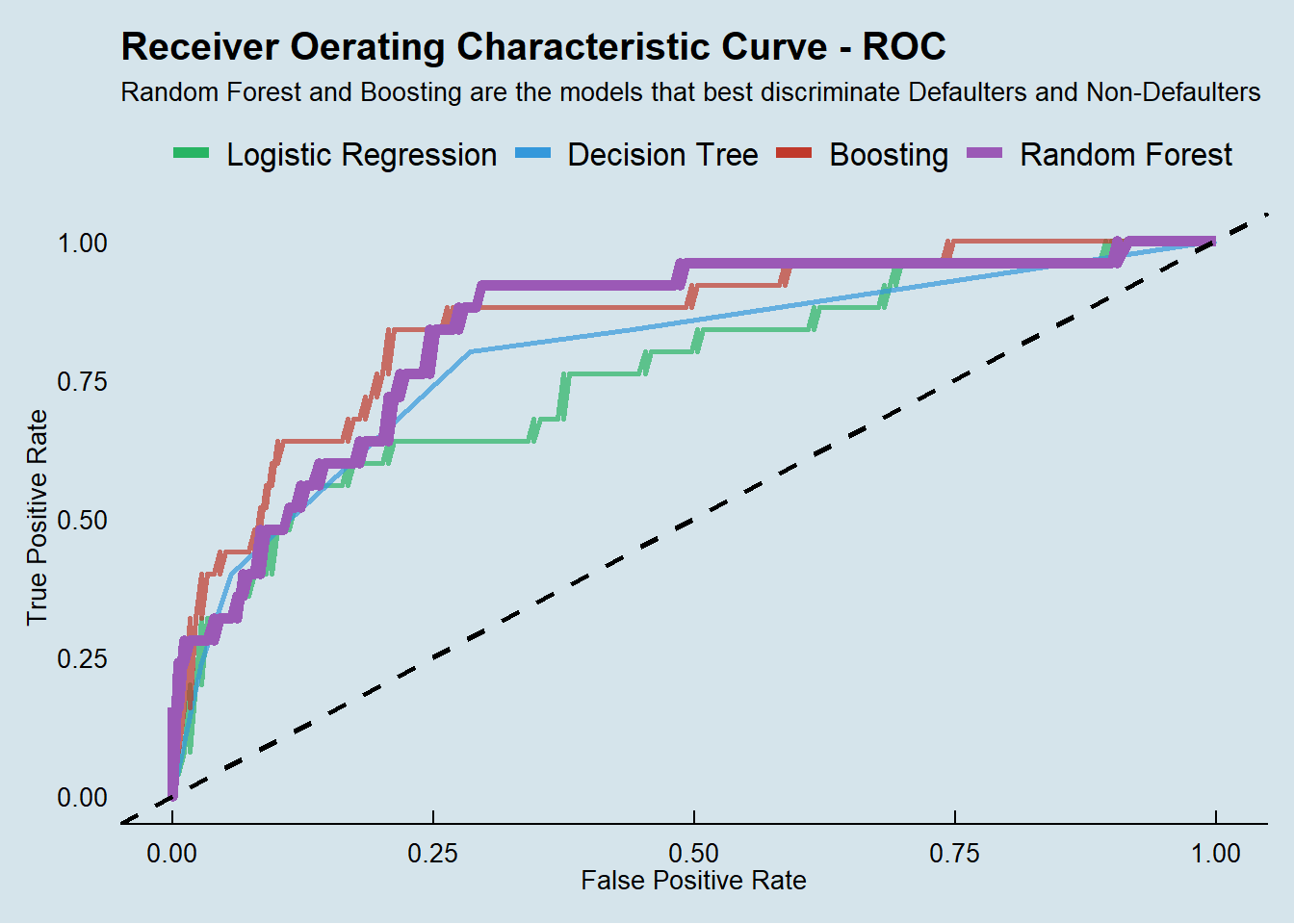
Now we look to the ROC curve of our models.
The Receiver Operating Characteristic Curve is a plot that shows the discrimination ability of a binary classifier model as its classification threshold changes.
We get this chart by plotting the True Positive Rate (TPR) against the False Positive Rate (FPR) at different threshold settings.
The bigger the Area Under the Curve (AUC) the better the model is in classifying the observation.
2.3.5 Acurracy
We finally look at the Confusion Matrix at the best cut off of each model to get a sense of the accuracy we were able to get in this exercise.
We will use the custom functions described in Auxiliary metrics functions topic in the Data Preparation session of this site.
Boosting is the best model we got in this exercise following very closely by Random Forest.
# logistic regression
accuracy(score = prob.test$logistic.predicted,
         actual = prob.test$logistic.actual,
         threshold = metricsByCutoff.test_log[["BestCut"]][["Cut"]])
##
##
## pred.1 pred.0
## --------- ------- -------
## actual.1 16 9
## actual.0 59 120
## [1] "--------------------------------------------------------------"
## [1] "Model General Accuracy of: 66.67%"
## [1] "True Positive Rate of : 64%"# decision tree
accuracy(score = prob.test$decision.tree.predicted,
actual = prob.test$decision.tree.actual,
threshold = metricsByCutoff.test_DT[["BestCut"]][["Cut"]])##
##
## pred.1 pred.0
## --------- ------- -------
## actual.1 20 5
## actual.0 51 128
## [1] "--------------------------------------------------------------"
## [1] "Model General Accuracy of: 72.55%"
## [1] "True Positive Rate of : 80%"# boosting
accuracy(score = prob.test$boosting.predicted,
actual = prob.test$boosting.actual,
threshold = metricsByCutoff.test_boost[["BestCut"]][["Cut"]])##
##
## pred.1 pred.0
## --------- ------- -------
## actual.1 21 4
## actual.0 41 138
## [1] "--------------------------------------------------------------"
## [1] "Model General Accuracy of: 77.94%"
## [1] "True Positive Rate of : 84%"# random forest
accuracy(score = prob.test$random.forest.predicted,
actual = prob.test$random.forest.actual,
threshold = metricsByCutoff.test_rf[["BestCut"]][["Cut"]])##
##
## pred.1 pred.0
## --------- ------- -------
## actual.1 19 6
## actual.0 41 138
## [1] "--------------------------------------------------------------"
## [1] "Model General Accuracy of: 76.96%"
## [1] "True Positive Rate of : 76%"3 Final considerations and project limitations
Unfortunately, this is not a real dataset with really interest variables such as client income, credit rate, and so on.
The dataset is also not big enough to deliver consistent results, we saw significant variation in the models depending on the split ratio, and the hyperparameters used in each model, but the dataset served very well for the intent of practicing the techniques and R programing skills learned in the class.